PowerXpress Lead Hub

Every lead. Every call.
One workspace.

A complete CRM for a sales team: leads, calls, messages, email, team chat, a voice assistant, deals, a calendar and a live 3D view of the pipeline, kept in step with Pipedrive.

crm.powerxpress.com
The idea

Leads should never wait for someone to remember.

The problem

Registrations sat in a CRM until someone remembered to look. People were called back late, and some leads were lost.

What it does

One live workspace shows every lead the moment it arrives, who owns it, how long it has waited and what to do next, with calls, messages, chat, quotes and deals in the same place.

46things Mr.X understands by voice
5roles, from Viewer to Admin
25jobs that run by themselves every hour
1,600+automated checks run before every release
The workspace

Work every lead, in one list.

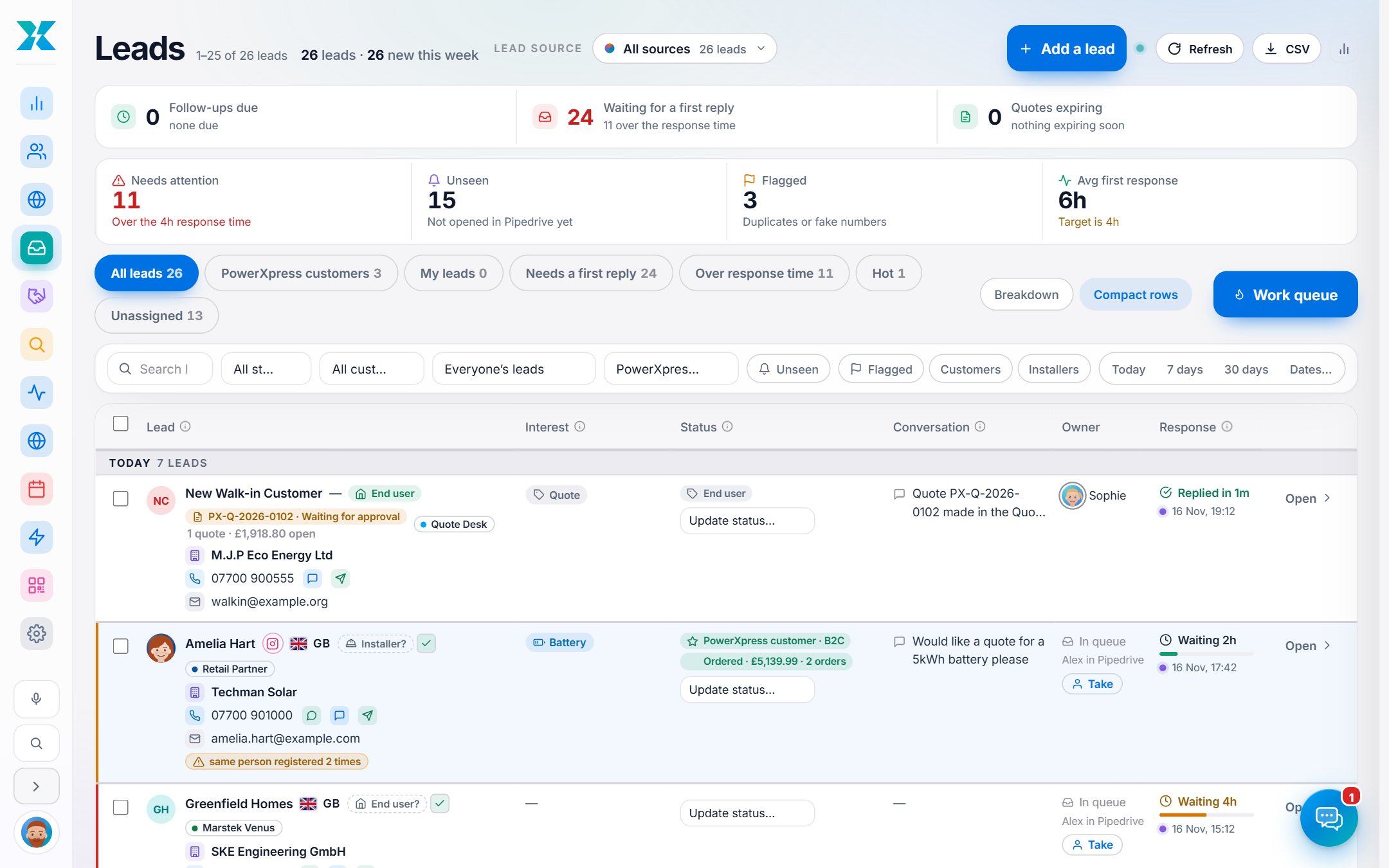
Every lead from every source lands here within seconds, with its interest, owner, status and a clock that shows how long it has waited. Filter, save a view, and let the work queue walk you through who needs you next.

One live list

Every source in one place, refreshing itself while the tab is open.

A waiting clock on every row

Green once answered, then an escalating amber and red the longer a lead sits.

Six headline tiles

Total, new this week, needs attention, unseen, flagged and average first response. Click a tile to filter.

Views with live counts

My leads, Needs a first reply, Over response time, Hot, Installers, Unassigned, and your own saved views.

Search and filters

By text, date, owner, status, customer type or whether they already buy from the shop.

Work queue

Steps through the leads that need you, newest untouched first, then the ones waiting longest. Skip when you want.

Call outcome card

Answered, voicemail, no answer or wrong number, with a note and a quick call-back date.

Duplicate and fake flags

The same email registered twice, or a placeholder phone number, is flagged on the row.

Customer type on every lead

End user, Installer or Wholesaler, with suggested types to confirm on older leads.

Bulk actions

Select many leads to email them, assign them, or move their source. Owners get one summary email.

CSV export

Export exactly the filtered view, with spreadsheet formula tricks defused.

Compact or comfortable

Choose row density, hide or show the interest and customer-type bars. It remembers.

The lead panel

A customer's whole story, one slide away.

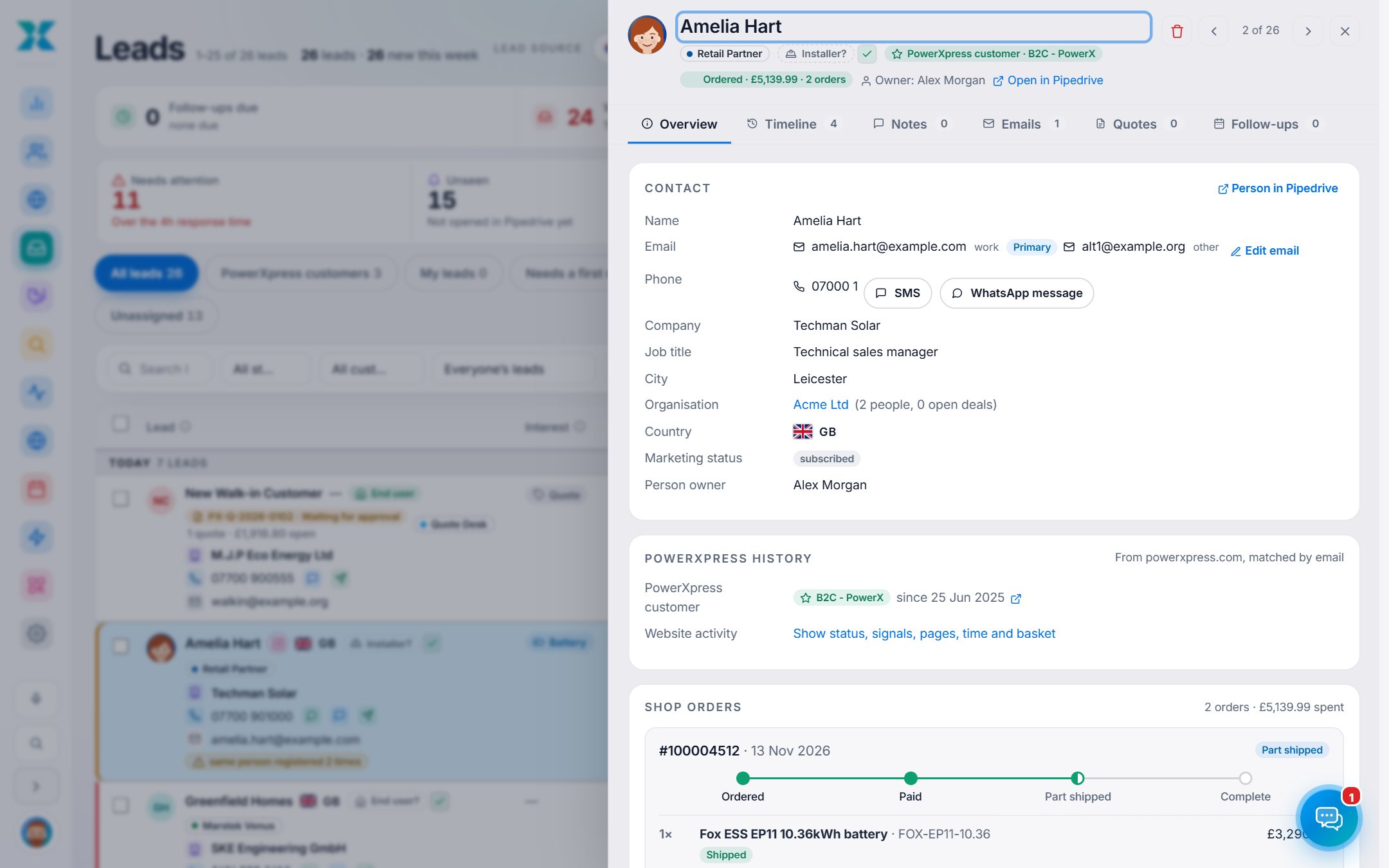
Open any lead and the full picture is there: contact details, every note, every call and message, emails, quotes, follow-ups and what they have bought. Arrow keys flip to the next lead.

A combined timeline

Notes, calls, texts, emails, quotes, deals and history in one stream, with filters.

Notes that say who wrote them

Every note carries its author and time. A note written while Pipedrive is down is kept and sent later.

Status in one click

Hot, Warm, Cold, Active, Inactive, New or Dead, with an optional note saved in the same step.

Follow-ups

Create a call, email, meeting or task, with quick dates. It lands in Pipedrive too.

Shop history

If the person is already a customer, their group, orders and website activity show here.

The ad they came from

The picture, campaign, ad set and wording of the ad that brought the lead in.

Every enquiry

All the times the same person has enquired, with source and time.

Refer to a colleague

Pass a lead on with a short message. The colleague is emailed.

Badges and origin icons

Instagram, Google Ads, QR code, website form or added by hand, and an Official installer badge.

Read-only banner

If you may only look, the panel says who holds the lead.

Built for the keyboard

Esc closes, arrows move between leads, Ctrl+Enter saves a note or sends an email.

Hub assignee and Pipedrive owner

Kept separate, so people without a Pipedrive login can still own leads.

Talk to customers

Call. Text. WhatsApp. Email.

Every way of reaching a customer is a button on the lead, and every touch is written back to the timeline. Phone, SMS and WhatsApp light up when an admin connects a provider.

Click to call

Rings the agent's own phone app first, then the customer. Calls are credited to the person who clicked.

Calls on the timeline

Duration, direction, recording link and note, matched to the lead by phone number.

Smart first-touch

An answered call of ten seconds or more counts as the first reply and stops the waiting clock.

SMS from the lead

A conversation thread of what you sent and what they replied, with company templates.

WhatsApp, done properly

Free text inside 24 hours of their last message, approved templates outside it.

STOP means stop

STOP, UNSUBSCRIBE or CANCEL blocks that number on every channel. START lifts it.

Email from your own Gmail

Sent in the PowerXpress design with a sign-off card, with templates and merge fields.

Templates for every level

Company, team and personal templates, suggestions that a leader approves, and designed HTML uploads.

Send a test first

See the exact email a lead would get, in your own inbox, before it goes out.

Bulk email

One personal email per ticked lead, in small batches, with a failure never stopping the rest.

Welcome emails by type

Map a customer type to a template and each new lead is welcomed once.

Missed-call alerts

When a lead rings and nobody answers, the owner is emailed with call-back and WhatsApp links.

Staff chat

The team talks where the leads are.

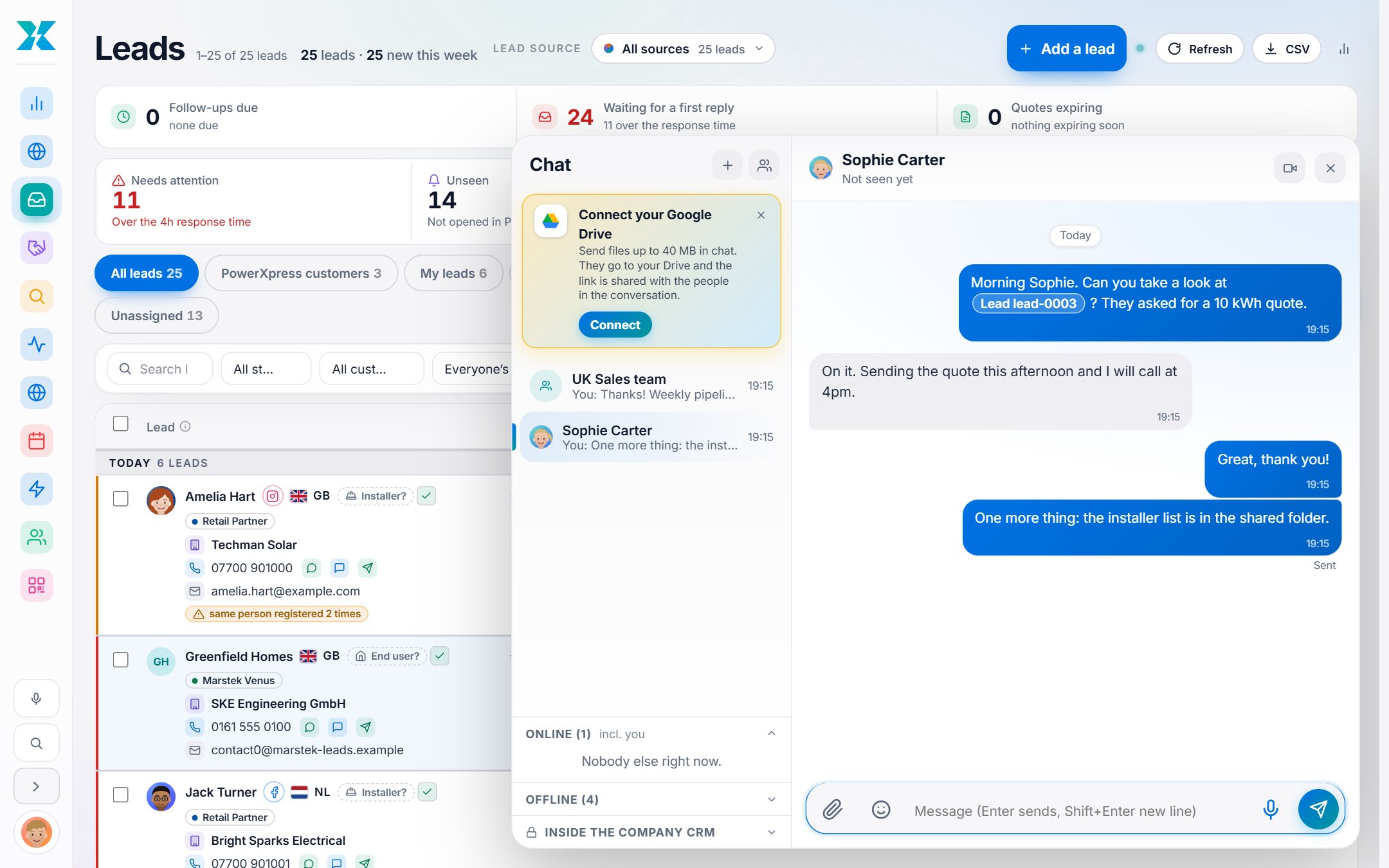
A built-in chat for the people who use the CRM: direct messages and groups, with read receipts, files, lead links that open the lead and a Google Meet button. Private by design.

Direct messages and groups

One conversation per pair, and groups of up to 30, run by leaders and managers.

Read receipts

Sent, Seen, or Seen by 2 of 3.

Lead links become chips

Paste a lead link and it shows the lead, opening under that person's normal permissions.

Files by paste or drag

Images, PDFs, Office files and archives. Scripts and executables are refused.

Big files go to Google Drive

When connected, large files are shared from the sender's own Drive.

One-click Google Meet

Creates a calendar event with a Meet link, invites the chat and posts a Join chip.

Private by design

Only members can read a conversation. Admins have no extra access, and the audit log never stores the text.

Unread badge

On the sidebar and a round button on phones. Optional unread-DM email that never includes the message.

Alerts in chat

Problem alerts are posted as Lead Hub alerts, so the team sees them first.

Voice assistant

Ask the CRM out loud.

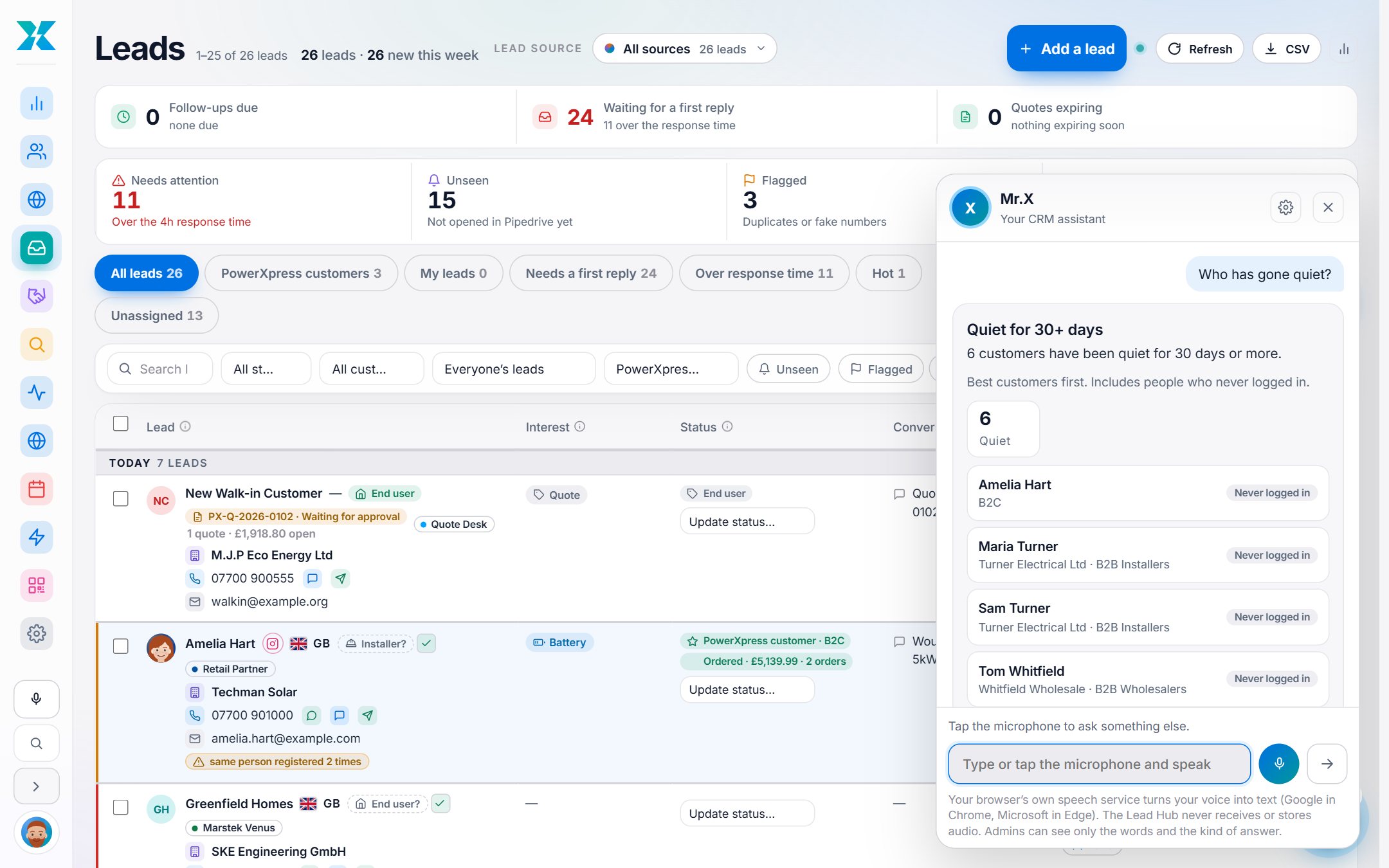
Say “Hey Mr.X, how many new leads today?” and hear the answer while the result appears on screen. Mr.X answers only from the Hub's own data, only about what that person is allowed to see.

Hands-free or push to talk

A wake word, a mic button, Ctrl+/ or just type. Voice and speed are your choice.

46 kinds of question

New leads, hot customers, follow-ups due, quiet customers, quotes waiting, deals by stage, who owns a lead, last note, tomorrow's calendar and more.

Understands how people talk

A fortnight, forty five days, half past two, and the usual speech-recognition slips. It remembers who “they” are.

Does things, with read-back

Change an owner or status, add a follow-up, move a deal, create a lead. It reads it back, you say yes, it does it.

Undo

The last action can be undone where it can be undone.

Hard limits

It cannot delete, cannot email, text or WhatsApp a customer, and cannot touch admin settings.

Your data stays yours

The browser turns speech into text. No audio is recorded or uploaded. Answers use the same role limits as the screens.

Optional smart understanding

An AI model can pick which fixed tool a sentence means. It sees only the sentence, never CRM data, behind daily caps.

Admin control

One switch turns it off for everyone, with a log of recent commands.

Roles and control

Everyone sees exactly what they should.

Manager, Team leader and Member levels, with visibility enforced in every query, not just hidden on screen. Leads move between teams through a request and approval trail.

Five roles

Admin, Manager, Team leader, Member and Viewer, each with a clear scope.

Members see their own

A member works only the leads assigned to them. A team can choose to share leads read-only.

Leaders and managers

A leader sees their projects and team. A manager sees every team they manage.

Transfer requests

Ask for another team's lead. The holder's leader, then manager, then admins decide, escalating after two working days.

Direct handover

A member can hand a lead they hold to a teammate, logged and notified.

Bulk assign

Share leads round-robin across chosen people, with one summary email each.

Sign in as

An admin can view the Hub as a colleague for four hours to help, with sending blocked and everything audited.

404, not 403

A lead you may not see does not exist as far as a direct link is concerned.

A full history

Every assignment and transfer lands on the lead and in the audit log.

Deals and quotes

From quote to won, on one board.

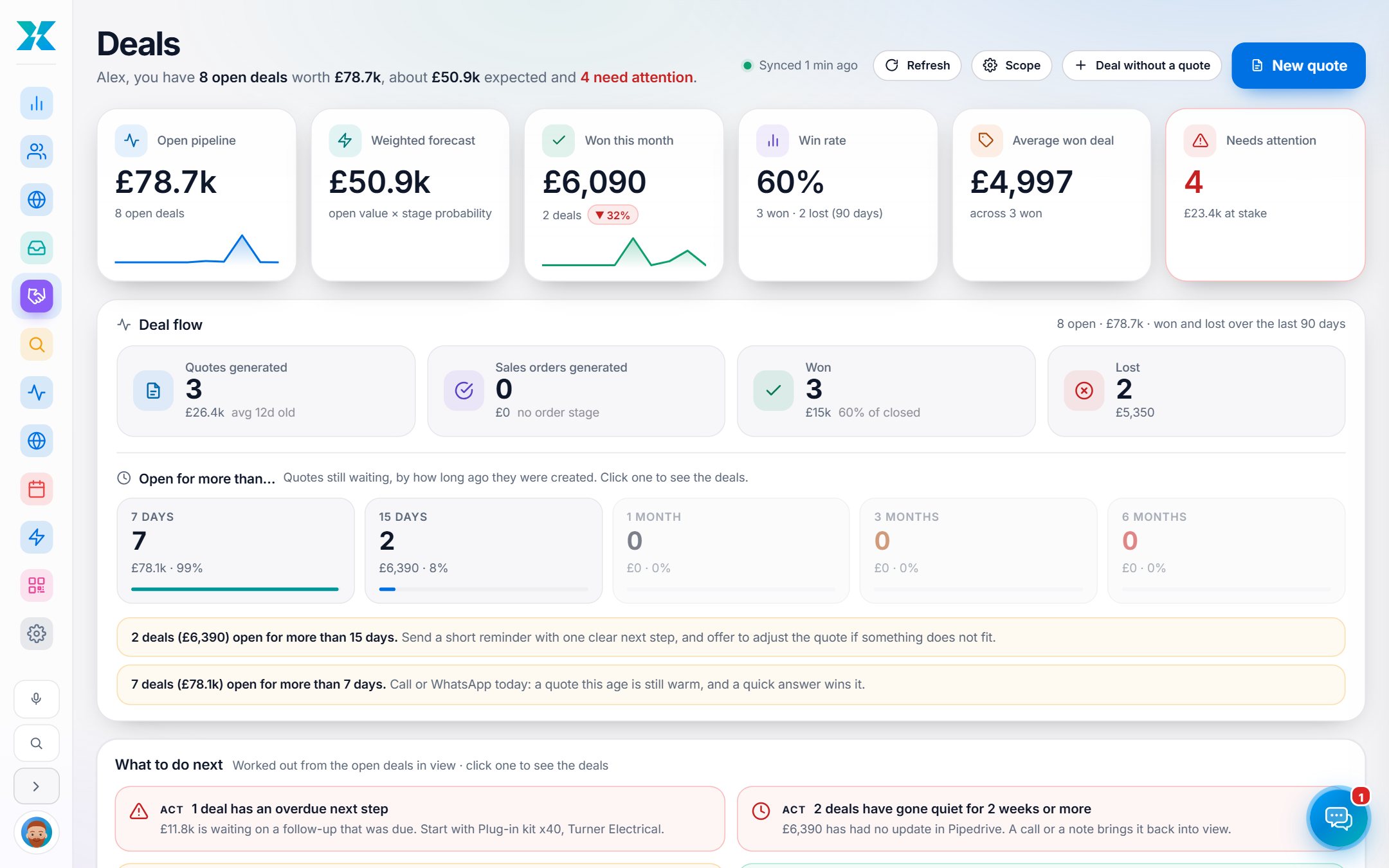
The Pipedrive pipeline as a drag-and-drop board and list, with quote lines on every deal, ageing prompts, automatic reminders and shop orders that close deals.

Board and list

Drag a deal to a stage or to Won or Lost (a reason is required). The change is written to Pipedrive first.

Open for more than…

Tiles for 7 days, 15 days, a month, 3 months and 6 months, with advice on what to do at each.

Automatic quote reminders

Reps get their own list, leaders their team's, managers their teams', on the morning after each step.

The quote on the deal

Every line, with product code, quantity, price, VAT and discount, written to Pipedrive deal products.

Orders close deals

A paid shop order close in value to one open deal wins it. Anything unclear becomes a suggestion to confirm.

Six headline figures

Open pipeline, weighted forecast, won this month, win rate, average won deal and deals needing attention.

What to do next

Cards worked out from the open deals: overdue steps, deals gone quiet, past close dates.

New quote button

On every lead. Opens the Quote Desk already signed in with the customer filled in.

Budget guard

Never reads or writes Pipedrive when its daily request budget runs low.

See everything

The pipeline as a place you can fly over.

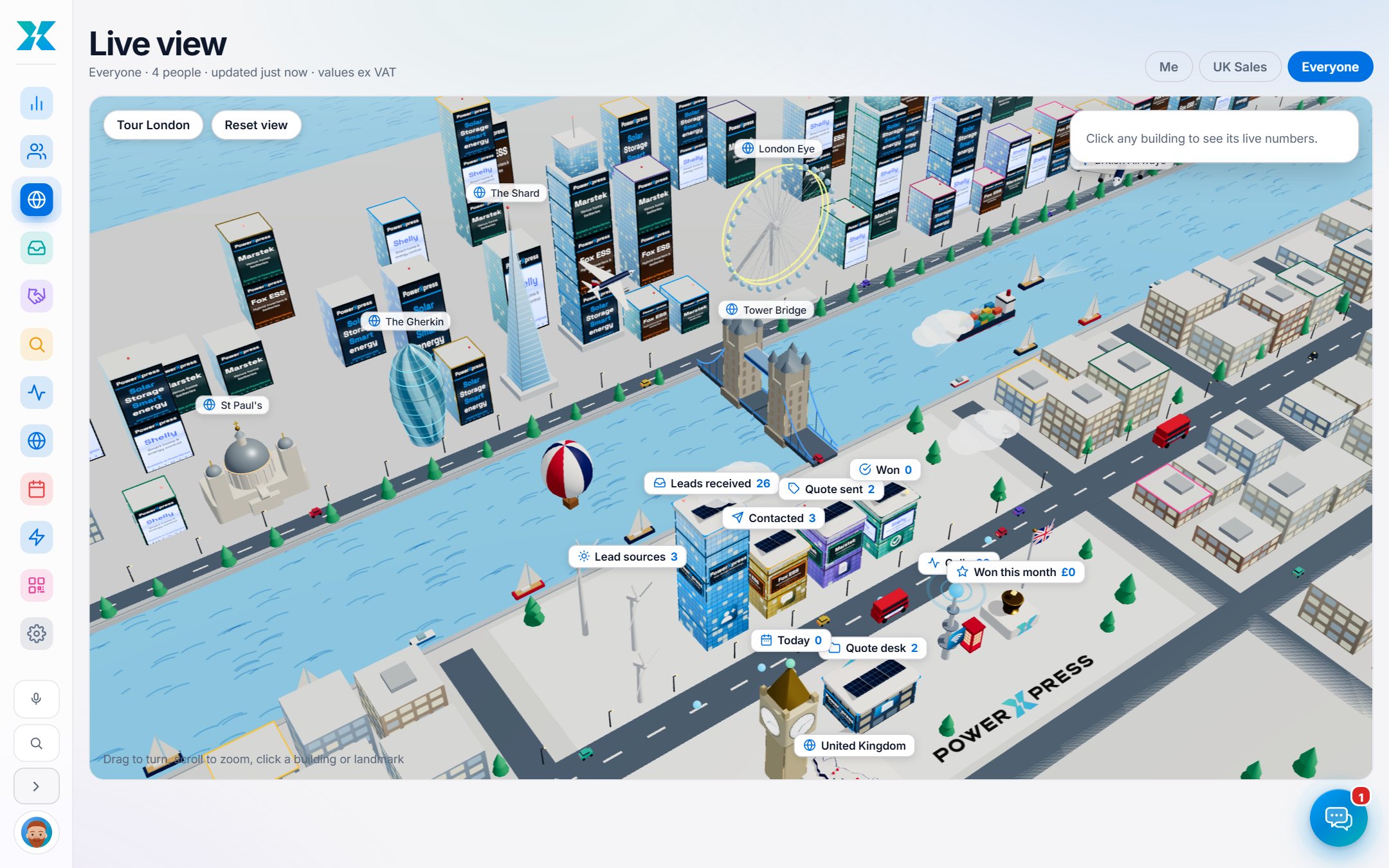
A dashboard for the numbers and a live 3D view for the picture: towers for each stage, wind turbines for lead sources, a clock tower for today and a trophy for wins.

Me, My team, Everyone

One dashboard with the scopes your role allows, computed from the Hub's own data.

A Today strip

New today, follow-ups due, calls to return and quotes expiring.

Funnels and forecast

Lead and deal funnels, win rate, open pipeline and weighted forecast.

Monthly targets

Ahead of pace, on track, behind pace or target reached.

What a lead and a sale cost

Per ad platform, with a stale-data warning.

Live 3D view

Click any building for its numbers. Same visibility as the dashboard.

Calling block

Calls, answered, talk time, answer rate and leads nobody has called.

Why we lose work

Lost reasons month by month, and pipeline ageing by stage.

Leaderboard

This month's results by person.

For management

How fast is every lead really handled?

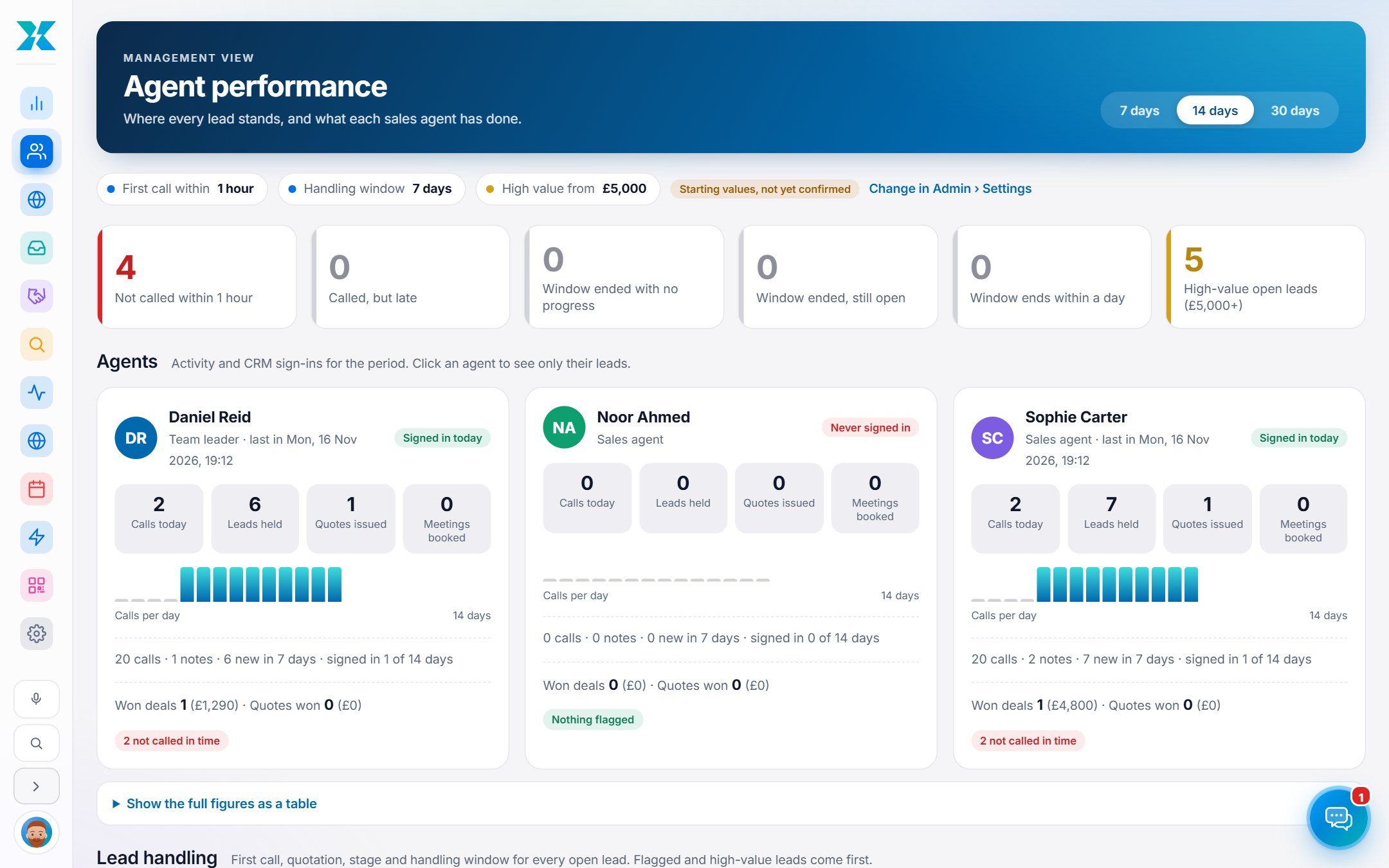
A page for management that shows what each sales agent has done and how quickly each lead got its first call, against targets you set.

First-call timeliness

Not called in time, called but late, window ended with no progress.

High-value watch

A threshold flags valuable leads that need a decision.

Per-agent activity

Calls per day, notes, quotes issued, meetings booked, won deals and sign-ins.

Your own rules

Handling window, first-call deadline and high-value threshold are admin settings.

Honest by design

Anything the Hub cannot capture, such as calls outside the phone system, is not shown as if it were.

A how-to guide

A short document for managers ships with it.

Calendar

Follow-ups and meetings in one diary.

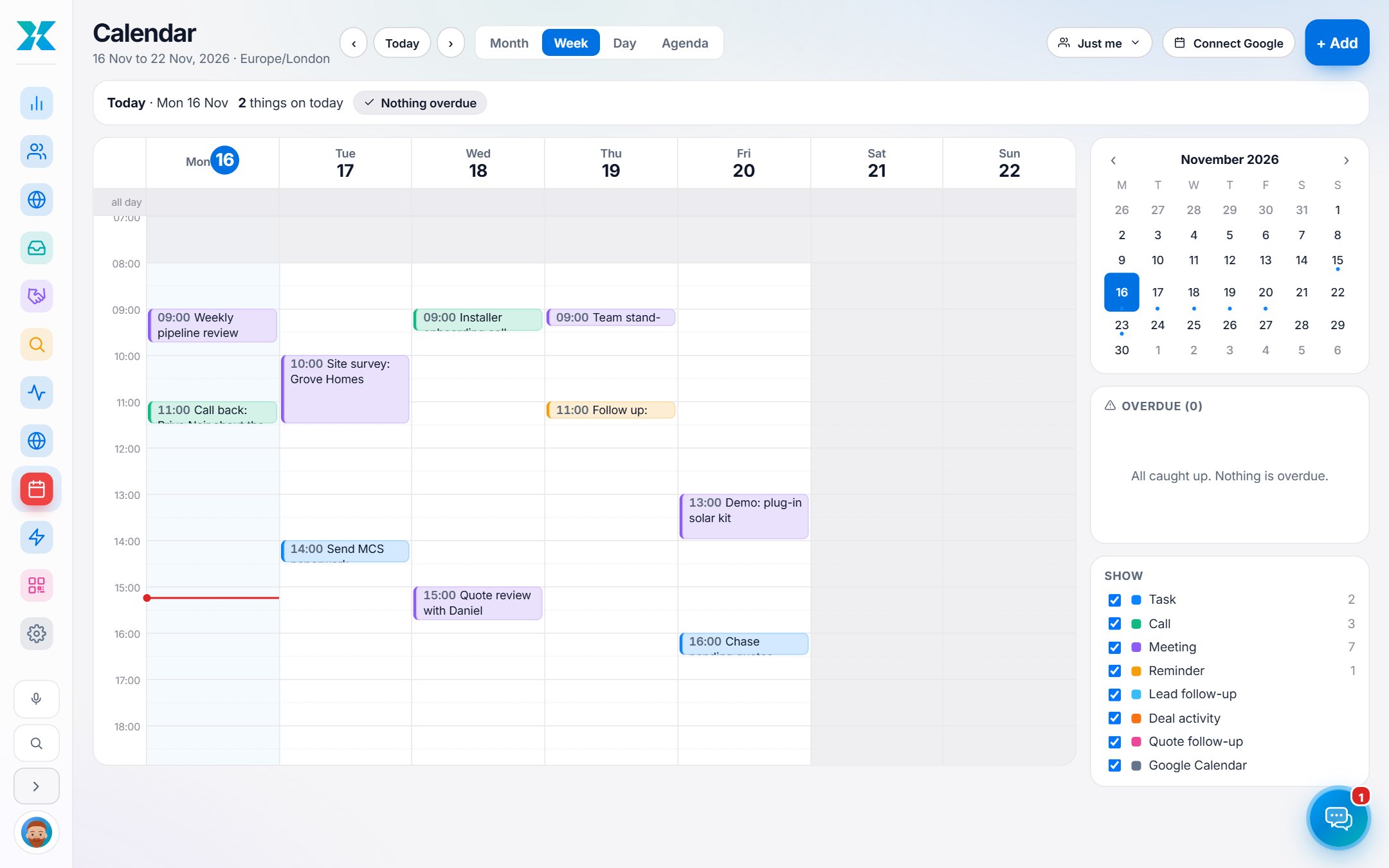
Every person gets a calendar that shows their own events, their CRM work and, when connected, their Google Calendar.

Month, week, day, agenda

Click an empty slot to add, drag to move, pull an edge to resize.

CRM work appears itself

Lead follow-ups, deal next steps and pending-quote reminders show up linked to the lead.

Managers see their people

Visibility follows the role. Private and Google events appear to others only as Busy.

Two-way Google sync

When connected, Hub events go to Google and Google events come back as busy time.

Reminders

Per-event reminders by email. Overdue items are listed beside the calendar.

Keyboard shortcuts

T today, J and K to move, M W D A to switch view, N new, ? for help.

Lead capture

Every way a lead can arrive, covered.

Personal QR codes, website forms, manual entry and ad platforms all feed the same list, written to Pipedrive and assigned to the right person.

A personal QR code for everyone

A scan opens a mobile form that says “You're in touch with” the owner. The lead is assigned to them.

Print, share, download

PNG, SVG, an A6 print card, WhatsApp, email and social share, with scans and leads per scan.

Privacy-first scans

Only time, country and device family are stored. Never an IP address.

Seven website forms

Installer network, commercial enquiries, basket quotes, call-back requests and more, all with a thank-you email.

Ad source on every lead

Platform, campaign, ad set and ad, shown as an icon, from the Marketing Hub.

Add a lead by hand

With a duplicate check, a customer type, and an option to request the shop account.

Spam protection

A honeypot field, rate limits and optional Cloudflare Turnstile.

Nothing lost

If Pipedrive is down the lead is saved and written on a later hour.

Smart routing

Owner first, then their team leader, then the unassigned queue with admins told.

Customer check and automation

Know who they are before you call.

Every lead is checked against the shop's customer list, and workflows take care of the follow-up work nobody wants to remember.

Customer check

Type an email and see if the person or their company already buys, in which group and since when.

Customer chips on leads

A PowerXpress customer, a company that is a customer, or a real paid order, visible on the row.

Behaviour status

Hot, Warm, Cooling, Dormant, Never logged in, from what customers do on the shop.

Buying signals

Repeat product views, downloads, a left basket and return visits email the owner.

Win-back list

Customers who have gone quiet, ready to call.

Workflows

Six triggers and eleven step types, such as send an email, create a follow-up, wait, or stop if the lead replies.

Dry run first

A new workflow only logs what it would do until a person switches it live.

Optional AI steps

Summarise a lead, rate it hot, warm or cold, or draft an email for the owner to approve.

Alerts and digests

Response-time alerts, a morning digest, an evening summary and a Monday team summary.

Run it your way

Settings that put the business in charge.

Everything a manager needs to run the team without a developer: sources, people, templates, alerts and the rules in between.

Lead sources

Rule-based groups with colour, notify addresses, welcome templates and bulk moves.

Team and teams

People, roles, job titles, projects, leaders, managers and the share-leads switch.

Email templates

Company, team and personal templates, a review queue and Pipedrive import.

SMS and WhatsApp

Providers, daily cap, approved templates and replies that matched no lead.

Settings for everything

Working hours, alert times, customer types, owner rules, welcome rules, monthly targets and contact details.

Audit log

Admin actions, settings changes, exports, messages, voice actions and impersonation.

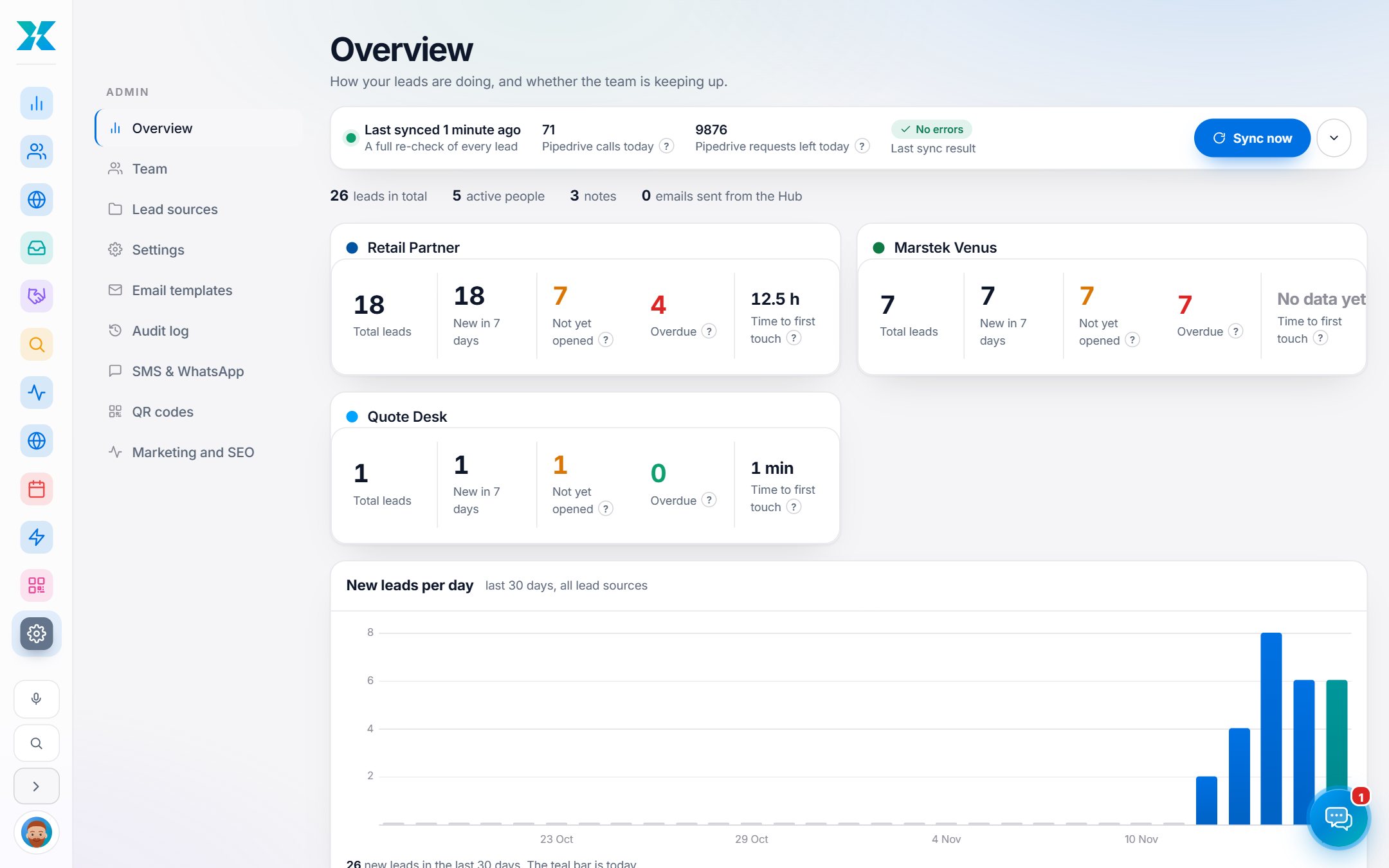
Overview and health

Leads per source and per day, sync health, and Pipedrive call accounting.

One-click hand-offs

Signed one-time links into the Marketing Hub and SEO Agent. No password passes through.

Trust

Built to be trusted.

A sales system holds people's details, so the rules are enforced in the code, not just hidden in the interface.

Scoped on the server

Role and team limits apply in every query, export and direct link.

Accounts that hold up

Hashed passwords, revocable sessions, login throttling and one-time reset links.

Encrypted tokens

Gmail, Calendar and Drive tokens are encrypted and bound to their owner.

Audit trail

Admin actions and settings changes are logged by field name, never raw content.

Signed everywhere

Every public endpoint verifies a signature or key. Quote Desk links expire in two minutes.

Safe messaging

STOP handling, daily caps, working-hours rules and no messaging through shared logins.

Connected

Plays well with others.

The CRM sits in the middle of the tools the team already uses, and keeps them in step.

Pipedrive
Gmail
Google Calendar
Google Meet and Drive
Cloudflare Workers and D1
CloudTalk
Twilio SMS
WhatsApp (Meta)
Brevo
The PowerXpress shop
Quote Desk
Marketing Hub
SEO Agent
Cloudflare Turnstile
Workers AI
Specifications

Under the glass.

PlatformOne Cloudflare Worker with a D1 database, on its own domain.
Source63 backend modules (about 17,700 lines) and about 9,800 lines of browser code.
Data67 tables across 67 migrations.
AutomationOne hourly schedule that runs about 25 jobs, each checked against budgets and caps.
SyncPipedrive by webhook in seconds, hourly incremental sync and a two-hourly full reconcile.
Quality72 test files and about 1,670 named checks, all run before every release.
RolesAdmin, Manager, Team leader, Member and Viewer.
AppearanceLight and dark themes, saved per person, a Ctrl+K command palette, responsive down to phones.
LanguageEnglish interface. WhatsApp templates carry a language code each.

Built with AI. Directed by one person.

The CRM runs the sales team at PowerXpress every day.